Space Raiders
Classic arcade shooting in blazing neon.

About Space Raiders
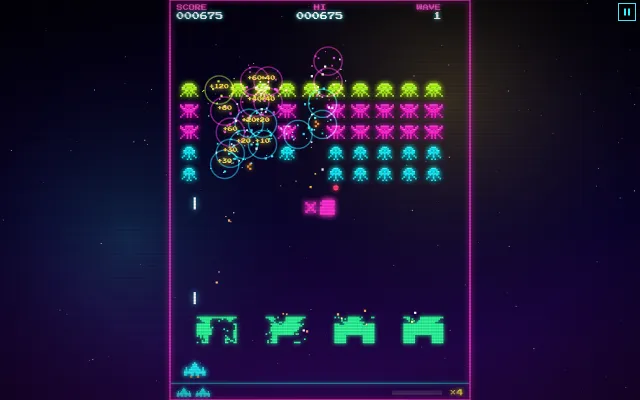
The arcade classic style, reborn in glowing neon. Rows of pixel raiders march across the screen and creep lower with every turn, faster and faster as their numbers fall. Hide behind shields that crumble under fire, shoot down the mystery saucer for bonus points and never miss, because every hit in a row builds your multiplier up to ×8. Arcade mode adds power-ups, new formations and a boss every fifth wave, while Classic keeps it pure with a single shot at a time. Real arcade sounds, a marching beat that speeds up with the action, and your best scores on the board.
- Arcade mode with power-ups, formations and boss waves
- Classic mode for the pure one-shot arcade challenge
- Chains up to ×8 and an extra life at 10,000 points
- Neon pixel art, screen shake and retro scanlines
- Authentic arcade sounds and a top ten score table
How to play
- Move and fireUse the arrow keys and Space, the mouse, or drag a finger and hold to fire.
- Stop the marchClear every raider before they reach your ship. They speed up as their numbers fall.
- Build your chainEvery six hits in a row raise your multiplier, up to ×8. One miss resets it.
- Grab power-upsIn Arcade mode, raiders drop rapid fire, spread shot, piercing shot, shields, bombs and extra lives.
Tips from the usta
- Clear the end columns first: the formation has further to travel and stays higher.
- Line up your shots. A chain at ×8 is worth far more than rapid spraying.
- Your shots can destroy falling bombs.
- Watch the top of the screen: the mystery saucer is worth up to 300 points before your multiplier.
Game Details
- Category
- Arcade
- Players
- 1 player
- Platforms
- Desktop, tablet and phone
- Language
- English, Turkish, German, French, Italian, Spanish, Portuguese, Dutch, Indonesian, Japanese, Korean and Tagalog
- Developer
- Ibrahim
- Released
- 2026-10-31
Controls
| Action | Touch | Keyboard |
|---|---|---|
| Move | Drag your finger | ←, → |
| Fire | Keep your finger down | Space |
| Pause | Pause button | P |